

API Usage
API Usage shows recorded HawkSearch request volume by date and request type. Use it to monitor service activity and identify unusual spikes, gaps, or shifts in usage.
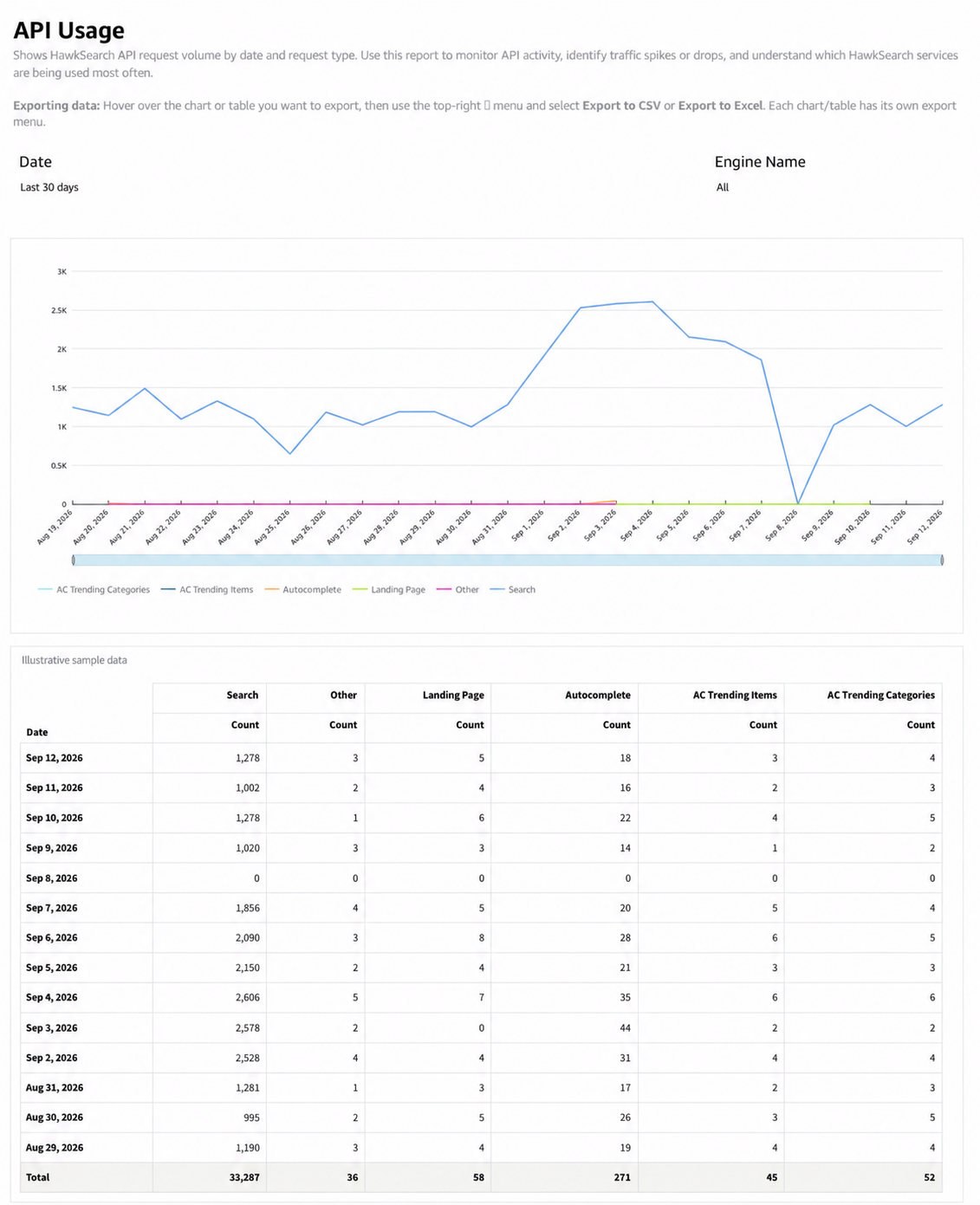
What the report shows
The time-series chart compares request counts across the service types present in the report. The corresponding daily table breaks out counts by date and request type and shows totals.
The categories shown in this report are Search, Autocomplete, Landing Page, AC Trending Items, AC Trending Categories, and Other. AC denotes autocomplete.
How to use the report
- Choose the date range and engine you want to review.
- Inspect the trend for sudden increases, decreases, or gaps.
- Use the legend and daily table to determine which request type changed.
- Compare the timing with site activity, releases, or implementation changes.
- Export the relevant daily counts when investigating the pattern with your technical team.
Interpreting the results
API requests measure service calls. They are not unique visitors, completed purchases, or necessarily one-for-one customer searches. A change in implementation can change request volume without an equivalent change in customer demand.
Use Daily Searches and Google Analytics as complementary views of search and site traffic. Differences between their counts and API Usage can reflect different units of activity and reporting scopes.
The dashboard is a request-volume report. It does not by itself provide API latency, error diagnostics, billing totals, or a contractual usage calculation. Review the relevant operational source when you need those measures.
Updated 29 days ago