

Email Report Setup
Schedule reports for automatic email delivery. In Reports > Advanced Analytics, select the envelope beside the report to open Email Report. The dialog shows whether that report already has a schedule.
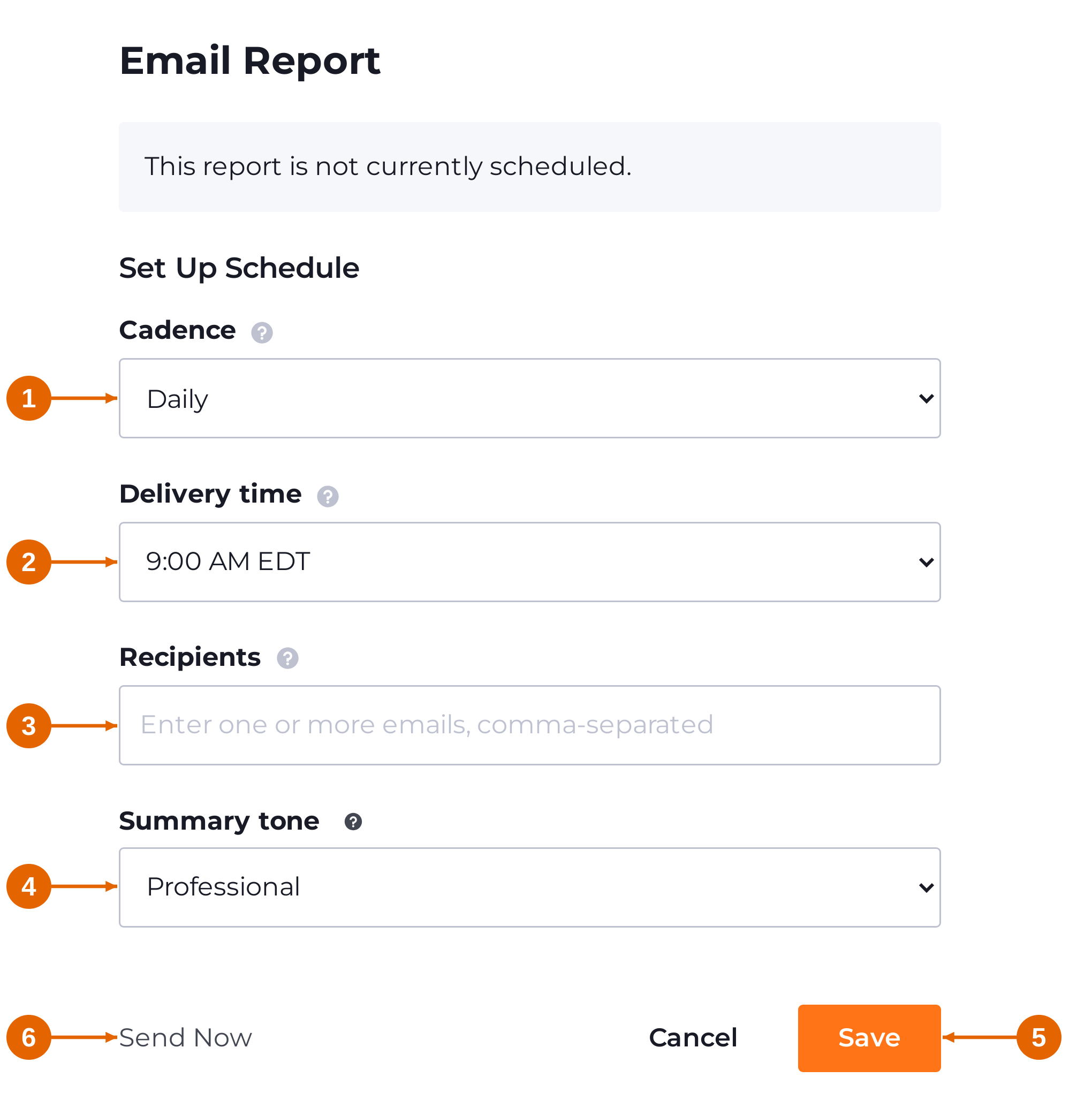
1 Cadence
Choose Daily for every day, Weekly for every Monday, Monthly for the 1st, or Twice a month for the 1st and 16th.
2 Delivery time
Select the sending hour. Times are shown in your local time zone; the report is sent at that hour on the days determined by its cadence.
3 Recipients
Enter one or more email addresses, separated by commas.
4 Summary tone
Choose None to omit the narrative summary. Professional uses a business tone; Friendly is conversational; Enthusiastic is upbeat; Analytical emphasizes figures. Choose Custom to describe your preferred voice. The summary covers the data on the report’s sheet; tone changes the writing style, not the data covered. Select the question-mark icon for examples.
5 Save
Select Save to store the schedule. Reopen the report’s envelope to review its settings.
6 Send Now
Select Send Now for immediate delivery. Check the recipients before sending. Select Cancel to close without saving changes.
Updated about 20 hours ago