

Bulk Upload Spelling Overrides
Note
Please do not create a new file from scratch and upload it - instead, use the template file provided on the dashboard. This will ensure your data is properly formatted.
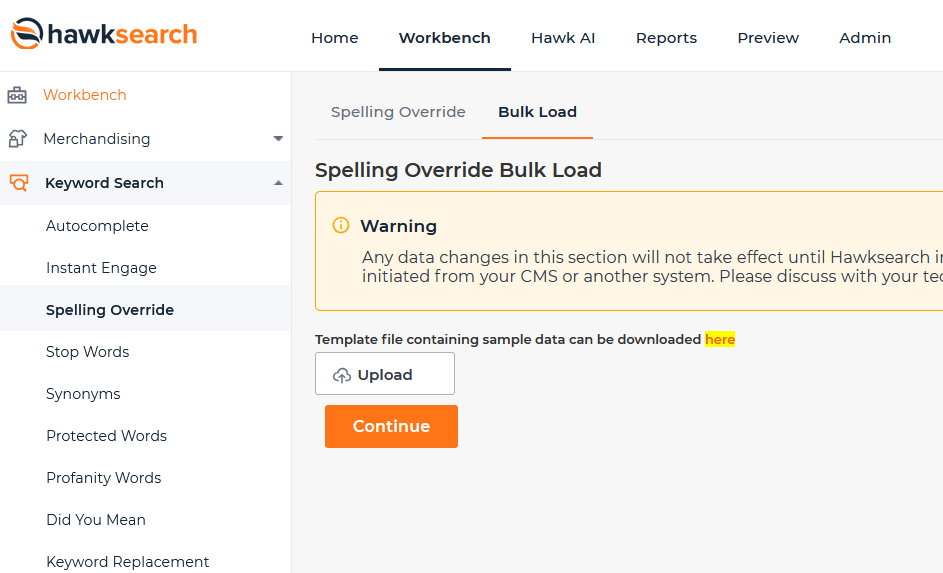
The "Spelling Override" page allows you to save time by bulk uploading a group of spelling overrides or keyword replacements rather than entering them one by one.
-
To navigate to the Spelling Override page, click on the "Workbench" tab in the top navigation bar.
-
Next, click on the "Keywords" link in the left navigation and choose "Spelling Override" from the sub-categories. You will then be taken to the Spelling Override Administration page.
-
Select the "Bulk Load" tab at the top of the page.
-
Download the sample data via the following link:
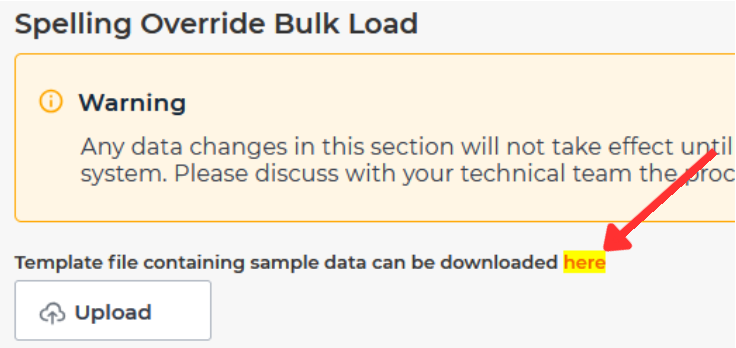
Once you've properly examined the format of the sample data, delete everything but the headers and input your own data.
Note
Because Keyword Replacement and Spelling Override utilize the same parsing, the header Is Regular Expression appears despite Spelling Override not being compatible with regular expressions. When inputting Bulk Spelling Overrides, make sure this value is always false.
-
Upload a text file that has been pre-populated with your list of Spelling Overrides.
-
Select "Continue".
-
Confirm that your file had been uploaded properly and select "Import Spelling Overrides".
-
Once you have confirmed the addition of your Spelling Overrides, return to the main "Workbench" home page and click the "Rebuild Index" button. Changes will not show up until the Index is rebuilt.
Updated 5 months ago