

Conversion Tracking
Displayed as Keywords Conversion Dashboard, this report connects search terms with clicks, attributed cart activity, attributed sales, and products purchased through search journeys. Use it to identify commercially important queries and investigate terms that attract searches but produce weaker downstream activity.
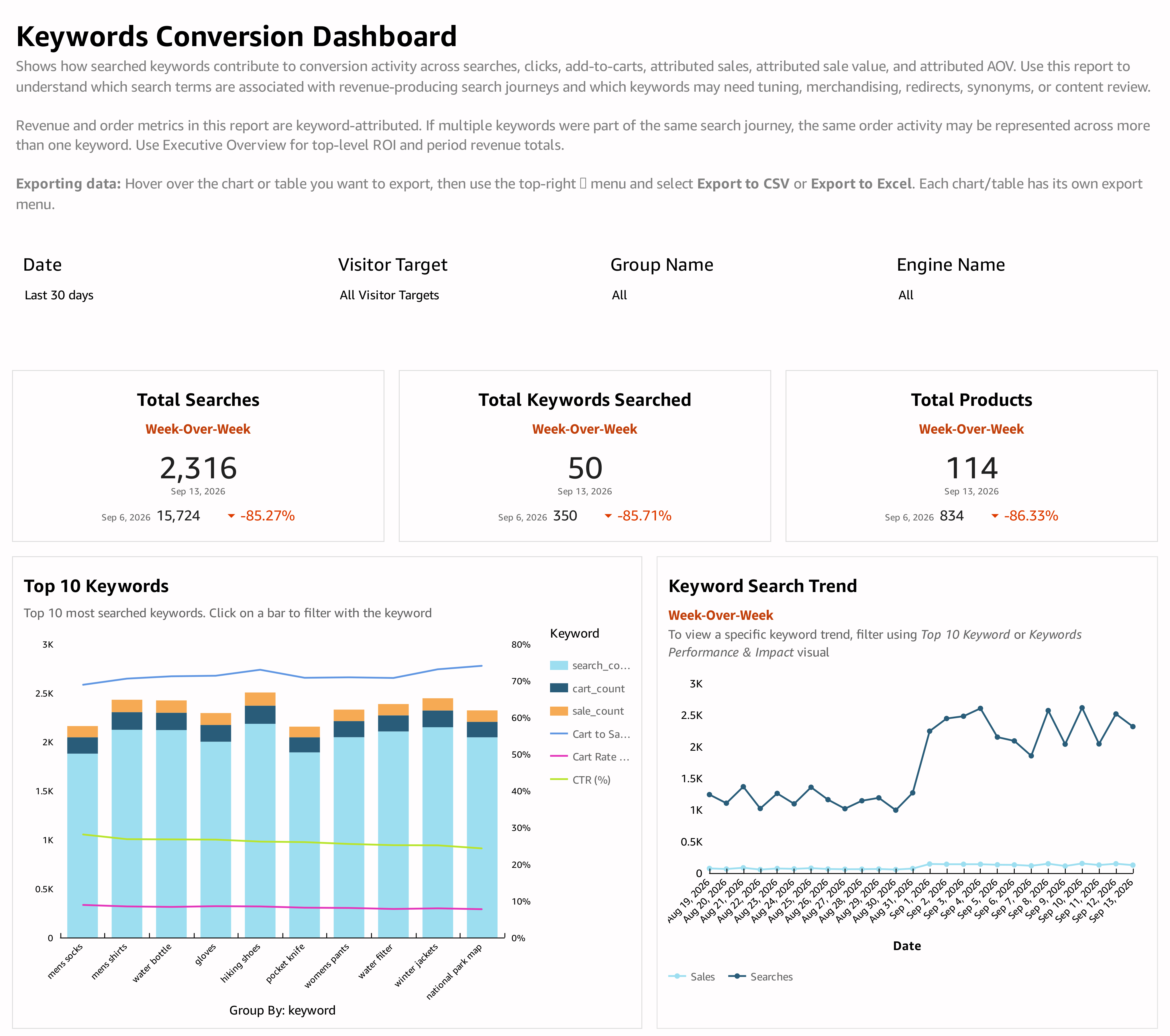
What the report shows
The summary cards compare Total Searches, Total Keywords Searched, and Total Products across their labeled periods.
Top 10 Keywords compares popular terms using search, cart, and sales measures alongside rate series. Keyword Search Trend shows searches and attributed sales over time. Select a keyword in the top-keyword chart or Keywords Performance & Impact table to focus the related views.
| Table measure | How to read it |
|---|---|
| Searches and Clicks | Search demand and result engagement associated with the keyword. |
| Attributed Add2Carts | Cart activity associated with the keyword's search journeys. |
| Attributed Sales | Sales activity credited to the keyword. |
| Keyword-Attributed Sale Value | Sale value associated with that keyword. |
| Attributed AOV | Average sale value within the keyword's attributed activity. |
| Search Conversion | Attributed sales activity relative to searches. |
Products Converted From Search lists product names, their associated keywords, attributed add-to-carts, and attributed product sales. Selecting a keyword in the performance table filters the graph above and this product table.
How to use the report
- Identify a high-volume keyword in the top-keyword chart or performance table.
- Select it and review its trend over time.
- Inspect the products associated with that keyword to see what customers actually purchase.
- Compare the search, click, cart, and sales measures to decide whether to investigate result relevance, product content, availability, or merchandising.
Interpreting the results
Revenue and sales measures are keyword-attributed. If several keywords were involved in a journey, the same order activity may appear under more than one keyword. Do not add keyword rows together to infer unique booked orders or site-wide revenue. Use Executive Overview for the top-level search-related totals.
The keyword and product tables also represent different levels of detail. Their cart counts should not automatically be expected to match. Read the labels and selected keyword context before comparing totals.
Updated 30 days ago