

Analyzers
Overview
Analyzers convert raw, unstructured text into structured, searchable tokens. They break text into individual words, strip out unwanted characters, and convert terms to lowercase so your queries match documents accurately. This section outlines the available analyzers. There are seven analyzer options that are available to select. The selection of an analyzer will override the default indexing configuration “Hawk Search Analyzer”. Each analyzer is explained below.
Analyzers
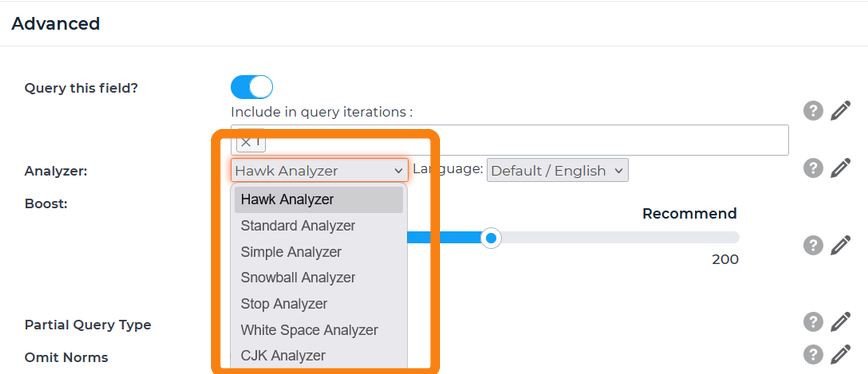
| Analyzer | Information | Best Used For |
|---|---|---|
| Snowball Analyzer | - Stemming is applied - Stop words are removed - Colons, #, %, $, parentheses, and slashes are removed - Removes underscores, hyphens, @, and & symbols unless they are part of words or numbers - Remove apostrophe if it is (a) at the beginning of a word, (b) at the end of a word, or (c) followed by the letter s - Separates numbers from text when numbers are at the beginning of a word - Letter characters are converted to lowercase.Note: The stemming step converts a word into its stem. For example, if the word “climbing” is entered, the analyzer would convert the word to “climb” and use that to search a field with the Snowball Analyzer set on it. It would return items that contained climber, climbing, and climb. It is possible that information can be lost describing the original form of your text. For example, the terms universe, university and universal all stem to the same root, “univers” and would all return the same results. This is likely not be the desired result. | Fields that have content consisting of multiple versions of a word. |
| Hawk Analyzer | The HawkSearch Analyzer has the same properties as the Snowball Analyzer (see above) but will take synonyms configured in the HawkSearch workbench into account. This is the default analyzer applied when the field is set to be queried. | Cases where the Snowball Analyzer would be used, with added functionality provided by HawkSearch's synonyms. |
| Standard Analyzer | - Separates text “smartly”, accounting for the following lexical types: Alphanumerics, Acronyms, Company names, Email addresses, Computer hostnames, Numbers, Words with an interior apostrophe, Serial numbers, IP addresses, Chinese and Japanese characters - Stop words are removed - Letter characters are converted to lowercase - No stemming applied | Searching English words such as units of measure as well as fields with the values listed above. |
| Simple Analyzer | - Separates text at non-letter characters and removes all non-letter characters - Letter characters are converted to lowercase - No stop words are removed - No stemming applied | Fields that only have alphabetical characters and don’t need the advanced interpretation of the Standard Analyzer. For example, consider a field that stores famous 1-line quotes that will be queried. If a user searches “to be, or not to be” removing the standard stop words would leave nothing to search on. Additionally, if stemming were applied to this field, the results would not be as relevant as they would be without stemming. In a case like this, the Simple Analyzer makes a good choice. |
| Stop Analyzer | - Stop words are removed - Divides text at non-letter characters and removes all non-letter characters - Letter characters are converted to lowercase - No stemming applied | When a simple, text-only analyzer is needed that also removes stop words. This should be used on fields that are intended to only have values made up of alphabetic characters. |
| White Space Analyzer | - Search terms divided at whitespace - No characters are removed - No characters are converted to lowercase - No stop words are removed - No stemming applied | Searching by exactly what is entered by user. This could be useful on a field that may be queried with terms that are both proper names and common nouns such as:polish vs. Polish bill vs. Bill case vs. Case. |
| CJK Analyzer | - Uses bigram tokenization to break down CJK text into overlapping two-character sequences - Built on top of the Standard Analyzer. | Designed for Chinese, Japanese, and Korean (CJK) text, and effective for languages that don’t use spaces to separate words. |
Language
Both the Hawk Analyzer and the Snowball Analyzer have an additional Language Analyzer attached to them.
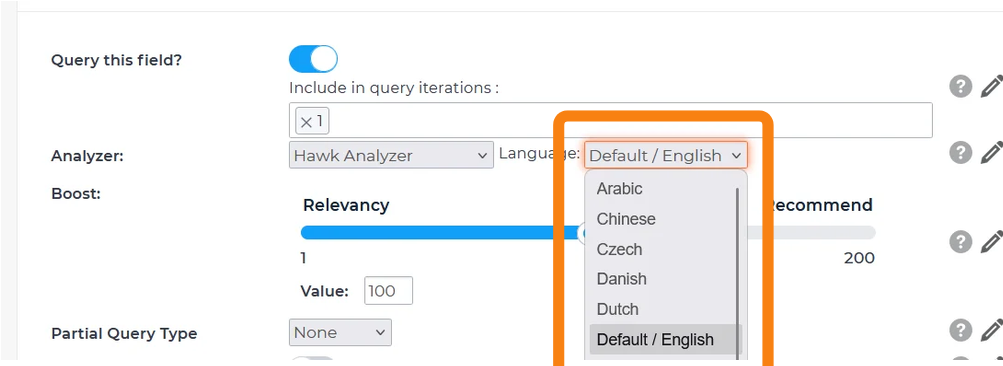
| Analyzer | Information | Best Used For |
|---|---|---|
| Language Analyzer | - Handling stemming for various languages to return relevant and correct results out of the box - Handling searches with special characters/accents that various languages offer (e.g.: German searches that include ä ö ü ß) - Supports 20 languages through the HawkSearch dashboard. | Needing to display information on your website on many languages other than English, and returning relevant results in various languages. |
If you currently do not use our language analyzer and your search relevancy is fine, no changes are needed. However, if there are some cases that you believe could improve/be solved by applying Language analyzer, we’d recommend trying it out on Dev and testing out results. Also, if you start using Language analyzer, we strongly recommend to perform a search tuning exercise as this analyzer directly impacts relevancy. Please reach out to our Support or Client Success teams if you have any questions.
Updated 3 months ago