

Top Queries
Top Queries shows which search terms customers use and how those searches relate to clicks. Use it to prioritize high-volume keywords and find terms whose engagement deserves a closer look.
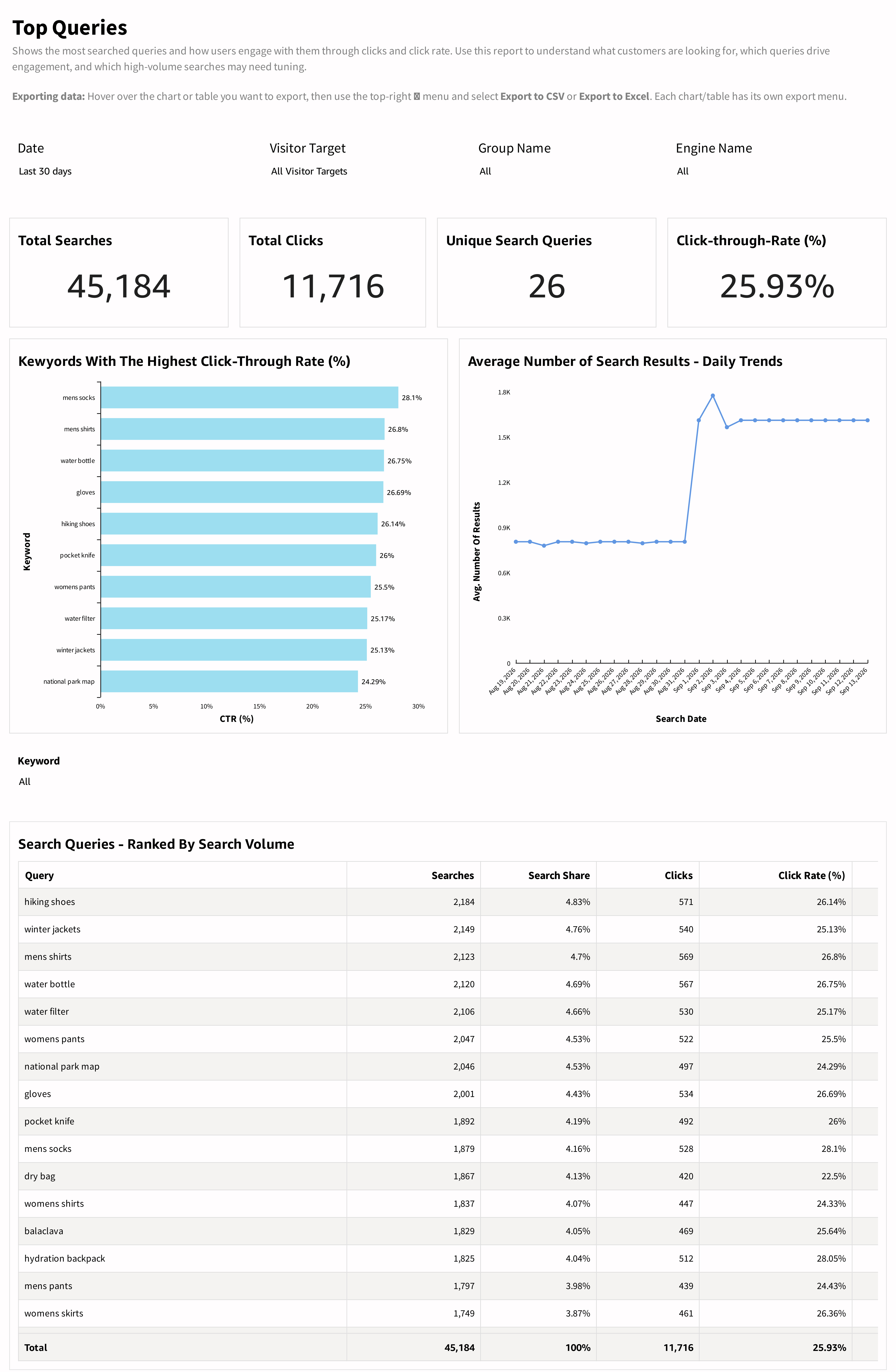
What the report shows
The summary cards display Total Searches, Total Clicks, Unique Search Queries, and Click-through-Rate. Unique queries describe the variety of terms represented in the view; they do not measure unique visitors.
The keyword click-rate chart compares the rates of the terms displayed. Average Number of Search Results - Daily Trends shows how result availability changes over time.
The Search Queries - Ranked By Search Volume table includes:
| Column | Meaning |
|---|---|
| Query | The search term represented by the row. |
| Searches | Recorded searches for the term. |
| Search Share | The term's share of the searches represented by the report. |
| Clicks | Recorded search-result clicks associated with the term. |
| Click Rate | Click activity relative to search volume for the term. |
How to use the report
- Set the reporting period and audience or engine.
- Start with the ranked table to identify terms that account for substantial demand.
- Compare clicks and click rate for those terms; prioritize high-volume terms with weak engagement.
- Use the Keyword control to focus your review.
- Review result availability, then open Queries with Poor Results, Click Position, or Conversion Tracking to investigate further.
Interpreting the results
A large result set does not establish relevance. Read result availability together with clicks and conversion activity. Similarly, a high click rate indicates engagement with results, not necessarily a purchase.
Evaluate click rates alongside search counts. A small-volume query can have a high rate without contributing many clicks overall. Use Search Share to understand its importance within the selected view.
Updated 30 days ago